Game Version 1.6.0 Patch Notes - Legend of the Abyss Expansion (Part 1) (Nov 26)
November 26, 2026

Legend of the Abyss Expansion
(Part 1)
Flyff Universe Version 1.6.0
This document will be updated as needed prior to the release

Dungeon Team Search
With this update, you’ll be able to use the new Dungeon Team Search feature to find dungeon parties.
You’ll now be able to look for a party for the dungeon you want to run directly in the game.
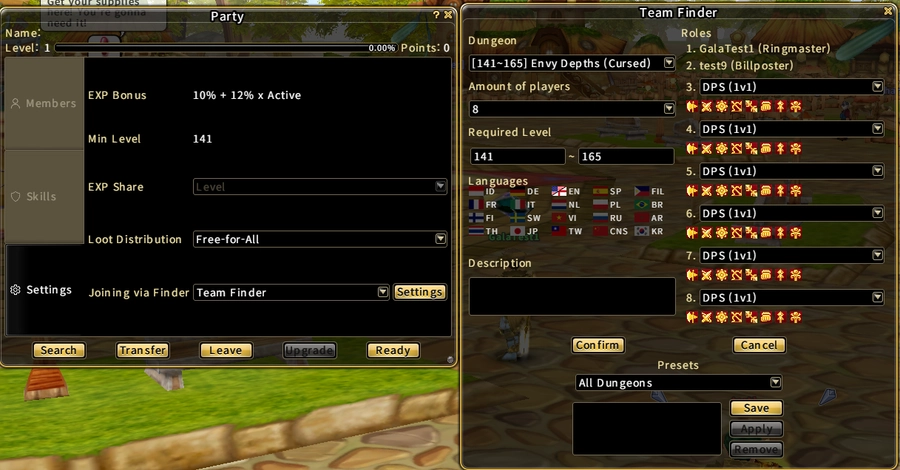
New settings for the Dungeon Team Search feature
In the Settings sub-menu in the Party menu window, you will have a new option in the “Joining via Finder” option called “Team Finder”.
Once you select “Team Finder” you will be able to choose who you would like to recruit to your party by selecting the conditions you would like to recruit your party members, such as dungeons, amount of players the party would be, level ranges, language choice for reference, which position of player you are recruiting (DPS, Healer, Tank, etc) and a description of the party you desire of.
You can also create multiple presets per dungeon of your choice.
Players who would like to join the party can use the “Search” button on the Party menu window and see what dungeon party members are recruiting for.
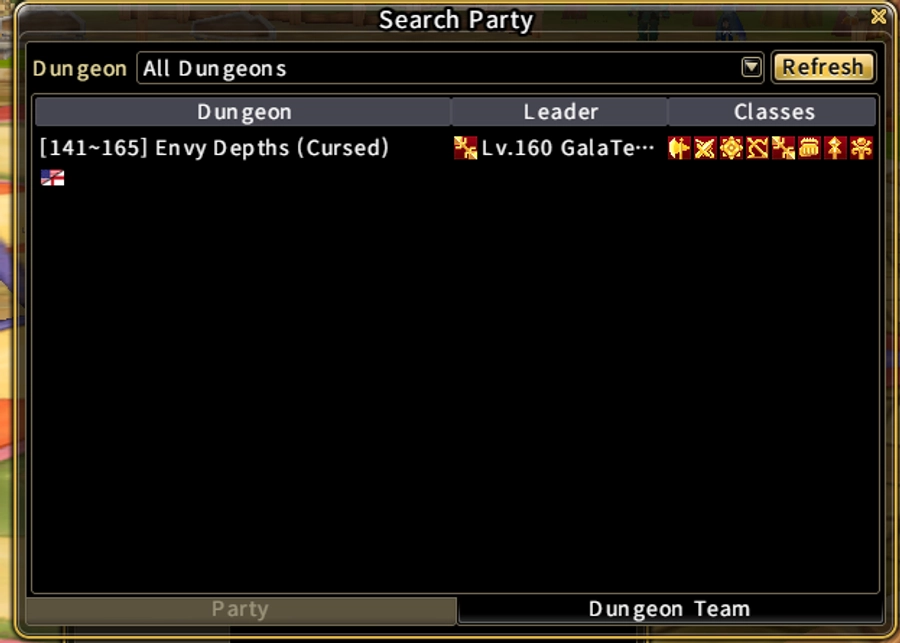
The new Dungeon Team tab for party searching
Dungeon Difficulty Expansion
Existing instance dungeons will receive new difficulty modes in this update, including dungeons such as Iblis, Clockworks, Meteonyker, Red Meteonyker etc. These modes give players a new challenge in encounters they already know as well as more drops.
Following difficulties were added for these Dungeons:
|
Dungeon Name |
Difficulty |
|
Iblis Leanes |
Very Hard (Lv 90+) Nightmare (Lv 110+) |
|
Clockworks War |
Very Hard (Lv 100+) Nightmare (Lv 120+) |
|
Meteonyker |
Very Hard (Lv 110+) Nightmare (Lv 130+) |
|
Red Meteonyker |
Very Hard (Lv 140+) Nightmare (Lv 160+) |
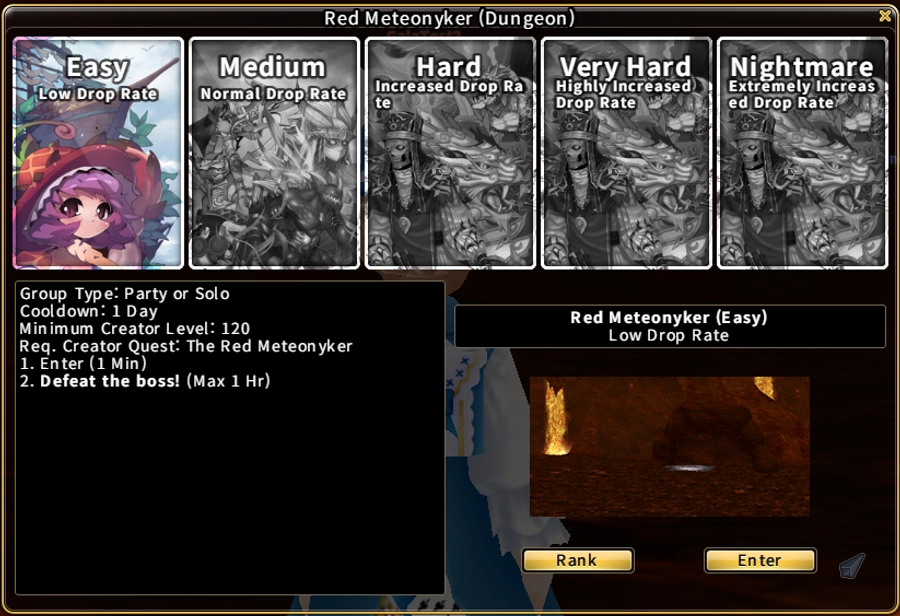
Example of the newly added difficulty for Red Meteonyker
Here are the list of major items for the newly added difficulties:
|
Dungeon Name |
List of items |
|
Iblis Very Hard (Level 90+) |
|
|
Iblis Nightmare (Level 110+) |
|
|
Clockworks Very Hard (Level 100+) |
|
|
Clockworks Nightmare (Level 120) |
|
|
Meteonyker Very Hard (Level 110+) |
|
|
Meteonyker Nightmare (Level 130+) |
|
|
Red Meteonyker Very Hard (Level 140+) |
|
|
Red Meteonyker Nightmare (Level 160+) |
|
Content Guide
The new Content Guide window lets you see which activities are available to you and when they’re scheduled. We wanted to make it easier to check what’s coming up and plan your time in-game. You can find it in Menu→Helper→Content Guide.
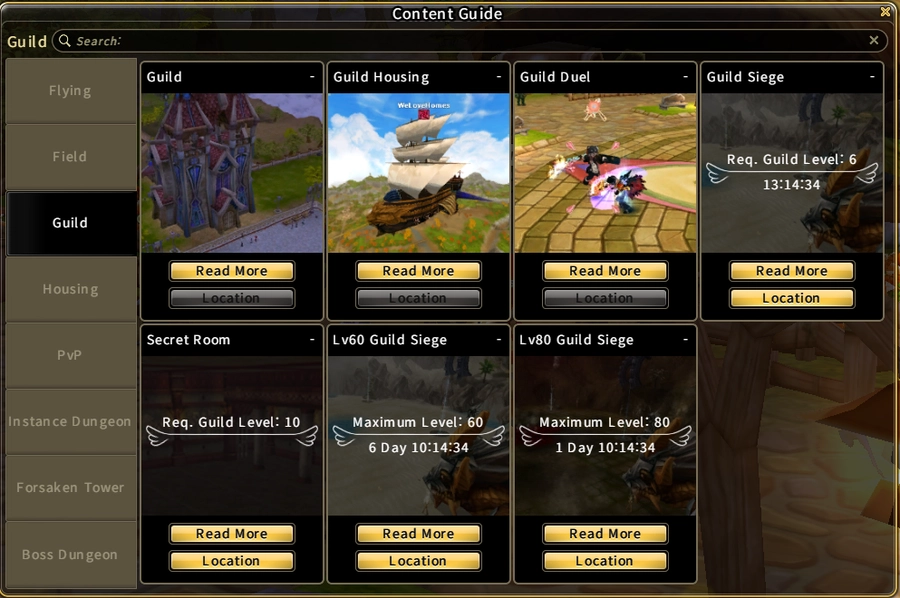
Content Guide example
You can view them either by category or search for a specific content of your choice. If it is a content that is open on a specific day, it will display how much time is remaining until that content opens.
Mail system updates
We’re also updating the in-game mail system.
You’ll be able to send multiple items to another player in a single message. Now the send tab has a new Attachments grid (5 columns, 25 slots in total) and you can just select the item from your inventory to insert and if there are stacks of items, you can select the quantity of how many you want to send. Right clicking or clicking the item will remove it and return it to your inventory.
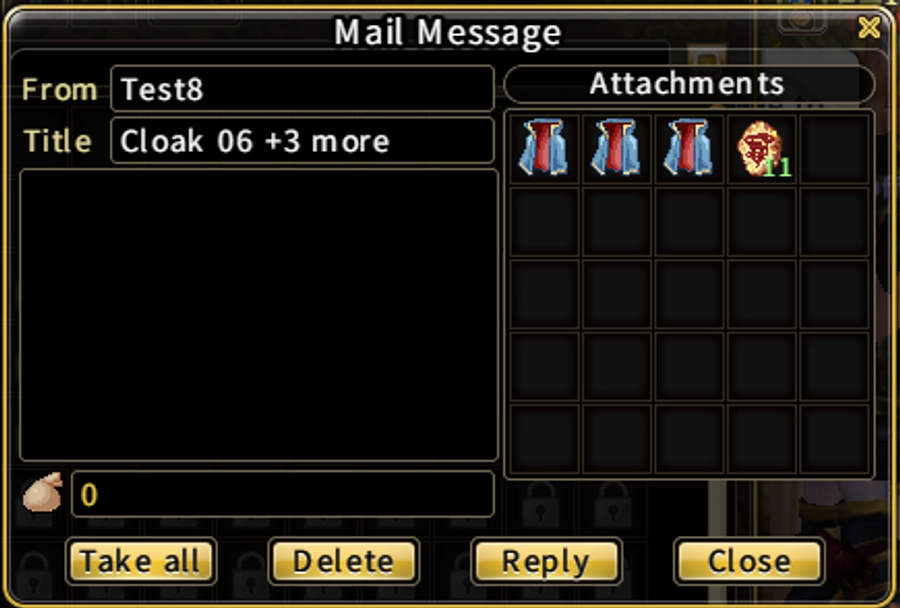
New mail system attachments
When you receive a message with attachments, you can click Take All to move them all into your inventory at once.
The fee per message will stay the same at 500 Penya per mail, regardless of how many items you attach. However, the late fees are still applied per item so be sure to collect them in time. Existing unclaimed items will be automatically moved to the new format during the update.
Farm Tracker
You’ll be able to view your recent farming history in a small window.
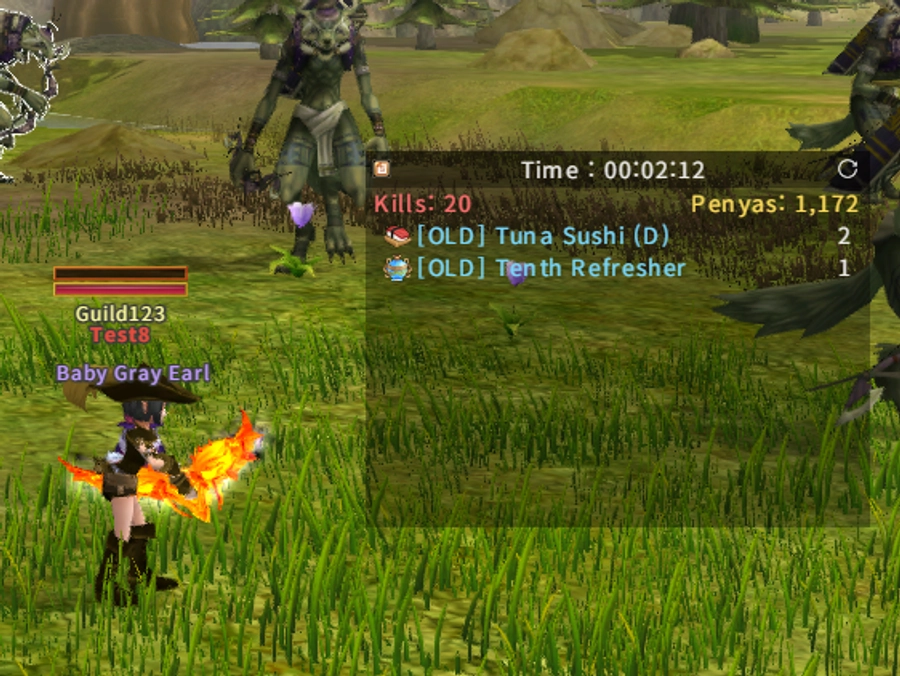
New farm tracker UI
The window appears after you defeat a monster. It shows the elapsed time, the number of monsters defeated, the Penya you’ve earned, and the items you’ve obtained. The items are sorted by quantity and you can view its tooltip by hovering over the icon.
Please note that the kill count is only counted if the player hit a monster and was nearby. Cones, egg-type creatures and “super” rank monsters are not counted.
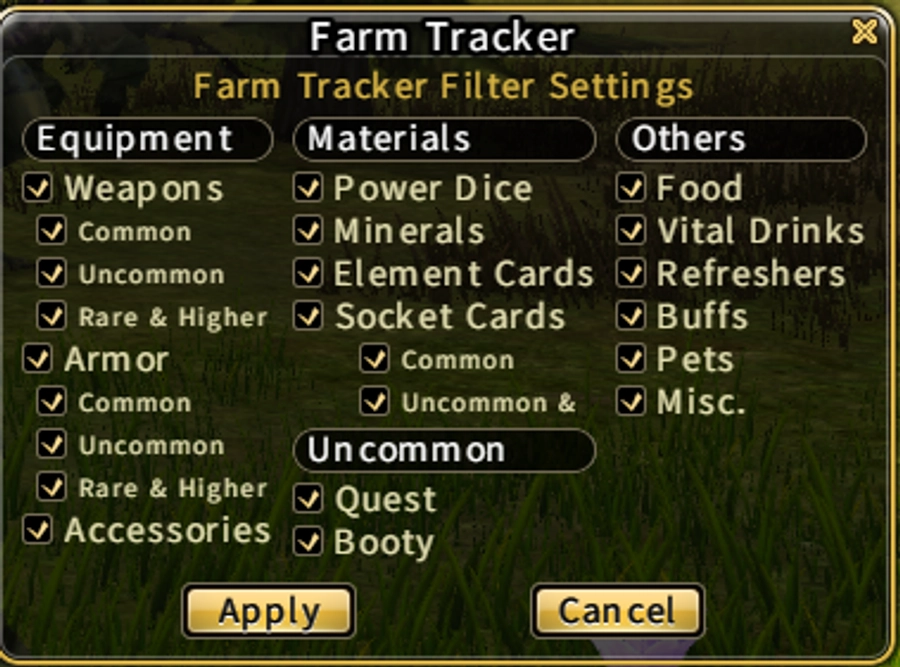
New farm tracker Filter UI
You’ll also be able to filter the item list to see what dropped from monsters and keep track of what you’ve picked up so far during your farming session. This filter is saved locally and is separate from your pet filter.
If you prefer to farm without the tracker on screen, you can turn it off entirely in the Options menu. If you turn it off, it will reset it and the panel is hidden immediately.
Shop sales history
Sellers can now see what they have sold from their personal shop.
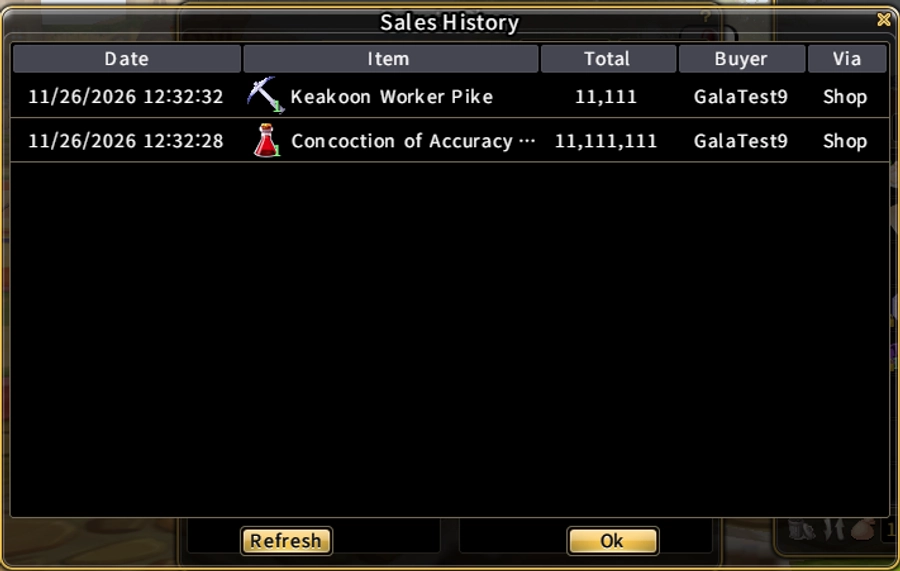
New Sales History window
After you sell an item via your private shop or vendor, you can review the transaction in the Sales History window. This window is only visible to the seller and is not visible to the visitors.
The window shows the most recent sales first and displays the date, item, total price, buyer, and whether the sale was made through a Private Shop or Vendor. It will show the sales made for the last 7 days and up to 200 sales. If you click on the Refresh button it will reload the list. Sales older than 7 days are deleted automatically.
Guild Siege stats
The game can now record per-player statistics during a guild siege and show them at the end.
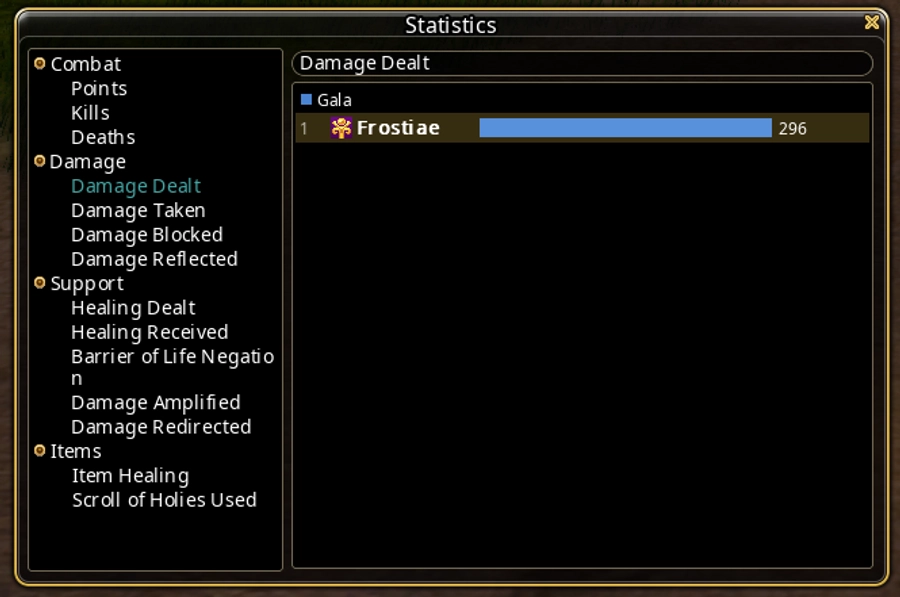
Preview of the stats window for Guild Siege
The game tracks statistics for all registered players from participating guilds, including those who join late. If you disconnect and rejoin, you’ll keep the statistics you recorded before disconnecting. At the end of the match, the results window opens on the new Statistics tab. These results are also saved in the database for later analysis.
The table below shows which statistics we track during each match. Over time, we may add more tracked stats based on your feedback.
|
Category |
Statistics |
|
Combat |
Points, Kills, Deaths |
|
Damage |
Damage dealt, Damage taken, Damage blocked, Damage reflected |
|
Support |
Healing dealt, Healing received, Barrier of Life negation, Damage amplified (Holy Cross / SwordCross), Damage redirected |
|
Items |
Item healing received, Scrolls of Holy used |
Blessing scrolls Auto-roll
We’re adding an Auto panel to the right side of the Goddess and Demon Blessing windows.
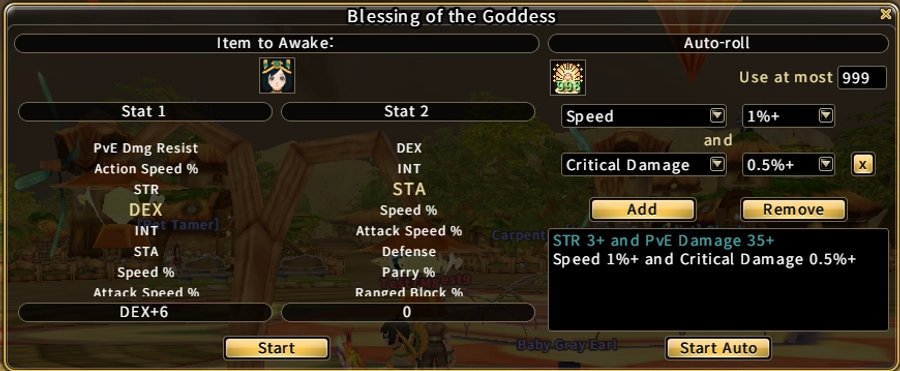
New Blessing scrolls’ UI
You can set a target combination and let the scroll reroll as long as you have enough scrolls.The target combination can be set with 1 stat with a minimum value and an option to have the 2nd stat settings as well. (Please note that if the 2nd option is set, this is an “and” condition, which means it will keep rolling until both conditions are met.) You can also set a hard cap on how many scrolls you would like to use. You can add several combinations to be listed; matching any one stops the roll.
You will be able to add multiple of these sets of the conditions you have created and by adding them to the list, you will be able to start the auto roll until your desired outcome is reached.
The matching combinations will be highlighted in green.
Elemental stones rework
The elemental stones of attack and defense are no longer attached to a weapon or suit.
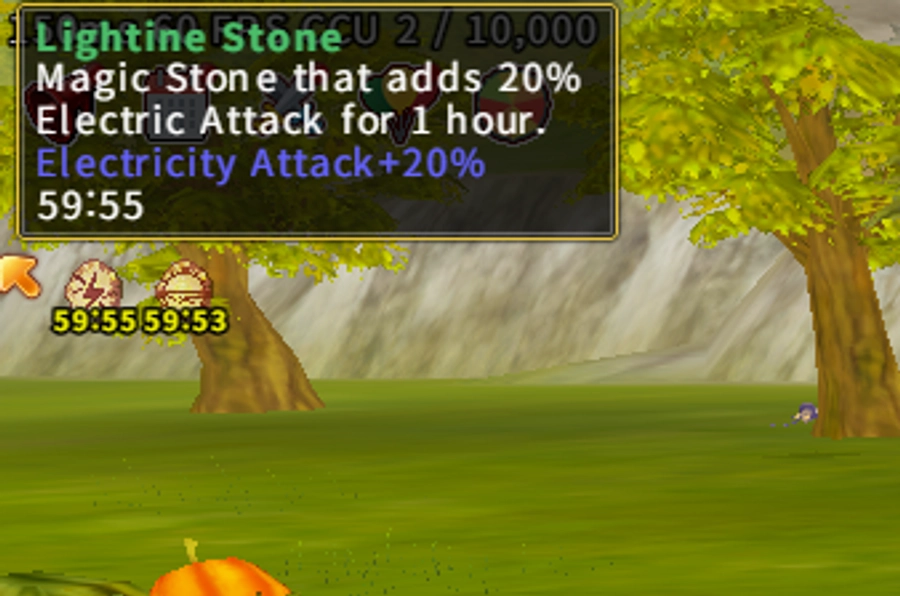
Elemental Stones Status
Now they will just give a simple timed elemental buff, regardless of whether you are equipping the weapon or armor of that elemental type buff infused into it.
Please note that in order to get the benefit of the buffs, you would still need to do elemental upgrades for the weapon and/or armor.
Fortune Pang's Roulette
We are introducing a new limited-time event feature: the Fortune Pang's Roulette. Designed to complement our existing direct-purchase shop items, this event is planned to offer a curated collection of exclusive cosmetics—including new costumes sets, mounts, and pets—alongside useful enhancement and character progression materials.
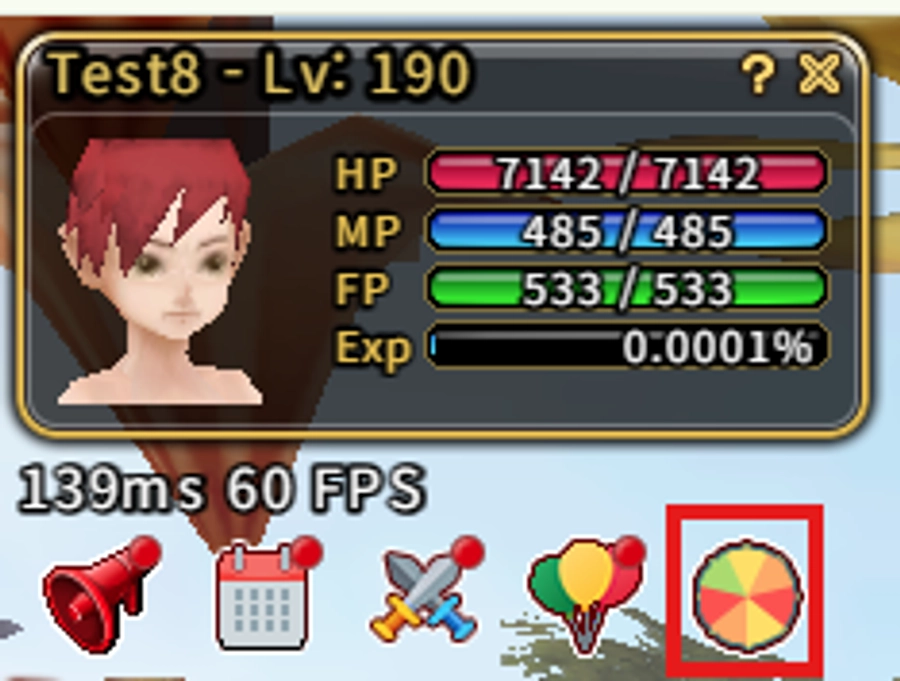
You can enter the Roulette via the Roulette icon
To keep the experience fair, transparent, and predictable, this system operates on a 10-draw cap with zero duplicates, allowing you to clearly estimate the maximum cost required to collect every reward in the pool.
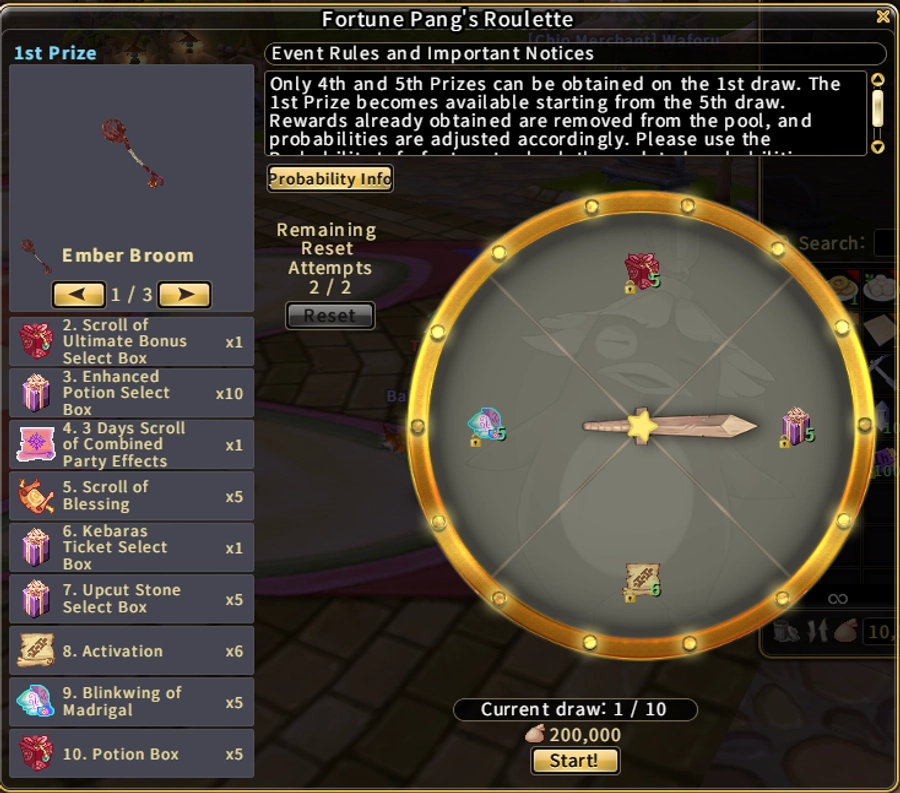
Example look of the new Fortune Pang's Roulette window
Key Features
- Try It with Penya: Everyone can join the event right away—your 1st and 2nd draws can be performed using Penya. Draws 3 through 10 use event-exclusive Fortune Pang's Roulette Ticket, which are available for purchase with 140 fCoin in the Premium Shop. You will also be able to just buy it directly from the event window if you are short on the Fortune Pang's Roulette Tickets, using your fCoins for the exact amount you need.
- Guaranteed Collection (No Duplicates): Each event board contains 10 unique rewards, and each reward can only be obtained once. Every time you draw, the item you receive is removed from the pool, guaranteeing that you will obtain all 10 rewards—including the 1st Prize—within a maximum of 10 draws.
- Flexible Progression & Optional Resets:
- Even if you claim the 1st Prize before your 10th draw, you are free to continue drawing to collect any remaining enhancement and progression items on the board.
- During select events featuring multiple costume variations (you will be able to choose your selection in the end), you will have the option to Reset the board after claiming the 1st Prize if you wish to collect additional sets.
Important Rules & Probability Disclosures
Before participating, please review the following event mechanics and probability details:
- Draw-by-Draw Reward Eligibility:
- 1st Draw: Only 4th and 5th Tier Prizes are eligible to be drawn. (1st–3rd Tier Prizes are excluded and have a 0% drop rate on the 1st draw).
- 2nd – 4th Draws: 2nd through 5th Tier Prizes are eligible. (The 1st Prize is excluded from the pool during Draws 1–4 and has a 0% drop rate).
- 5th – 10th Draws: The 1st Prize enters the pool, and all remaining uncollected rewards are eligible.
- Dynamic Probability Recalculation: Because previously obtained rewards are removed from the pool and certain tiers are restricted in early draws, the drop rate for each remaining eligible item is dynamically recalculated after every draw to total 100%, while maintaining their original relative probability ratios. Actual probabilities will vary depending on the results of your previous draws.
- Real-Time Probability Info: You can check the exact, updated drop rates for your current draw—displayed to four decimal places—at any time by clicking the "Probability Info" button in the event UI. Previously obtained rewards will be marked as "Obtained," and rewards ineligible for the current draw will be displayed as 0%.
- Event-Exclusive Roulette Tickets & Expiration: Roulette Tickets are strictly limited to the specific event period in which they are sold and cannot be carried over or used in future events. Once the event ends, the unused tickets will be refunded into fCoins on the next maintenance, so please keep them in your inventory.
- Board Reset Terms: If a reset option is available and you confirm a reset after obtaining the 1st Prize, your current draw progress, reward acquisition status, and dynamic probabilities will be cleared, restarting the board from the 1st draw. If you decline the reset (or if resetting is unavailable for that event), your current board progress will remain intact.
Currency Consumption and Prize Structure
Here is the list of how much currency will be consumed each time:
|
Round |
Required Currency |
Amount |
|
1st |
Penya |
200,000 |
|
2nd |
Penya |
1,000,000 |
|
3rd |
Fortune Pang's Roulette Ticket |
1 |
|
4th |
Fortune Pang's Roulette Ticket |
2 |
|
5th |
Fortune Pang's Roulette Ticket |
4 |
|
6th |
Fortune Pang's Roulette Ticket |
4 |
|
7th |
Fortune Pang's Roulette Ticket |
6 |
|
8th |
Fortune Pang's Roulette Ticket |
6 |
|
9th |
Fortune Pang's Roulette Ticket |
6 |
|
10th |
Fortune Pang's Roulette Ticket |
6 |
Here are the list of items you will be able to obtain during each event. Please note that these are subject to change and will be announced separately if they are changed.
|
Tier |
Item |
Quantity |
|
1st |
New Cosmetics |
1 |
|
2nd |
Scroll of Ultimate Bonus Select Box |
1 |
|
Enhanced Potion Select Box |
10 |
|
|
3rd |
3 Days Scroll of Combined Party Effects |
1 |
|
Scroll of Blessing |
5 |
|
|
Kebaras Ticket Select Box |
1 |
|
|
4th |
Upcut Stone Select Box |
5 |
|
Activation |
6 |
|
|
5th |
Blinkwing of Madrigal |
5 |
|
Potion Box |
5 |
Here is the information about the new items in the reward list:
|
Item Name |
Components |
Quantity |
|
Enhanced Potion Select Box |
Enhanced Potion of Recklessness |
1 |
|
Enhanced Potion of Swiftness |
1 |
|
|
Enhanced Potion of Clarity |
1 |
|
|
Enhanced Elixir of Anti-Magic |
1 |
|
|
Enhanced Elixir of the Sorcerer |
1 |
|
|
Enhanced Elixir of Evasion |
1 |
|
|
Enhanced Concoction of Profuse Bleeding |
1 |
|
|
Kebaras Ticket Selection Box |
1 Day Kebaras Ticket |
1 |
|
1 Hour Kebaras 2 Ticket |
1 |
|
|
Upcut Stone Select Box |
Upcut Stone |
1 |
|
Def-Upcut Stone |
1 |
Misc.
- For the Drop Filter, checking Weapons, Armors or Socket cards now also checks all their sub-options.
- The following items will no longer have [OLD] in front of their names to avoid user inconvenience.
- [OLD] VitalDrink 900
- [OLD] Meat Skewer
- [OLD] Seafood Pan Cake
- [OLD] Fish Soup
- [OLD] Sausage Casserole
- [OLD] Fish Stew
- [OLD] Steamed Seafood
- [OLD] Meat Salad
- [OLD] Gratin
- [OLD] Seafood Pizza
- [OLD] Gold Pill
- [OLD] Coral Island Curry
- [OLD] Tuna Sushi (D)
- [OLD] Ninth Refresher
- [OLD] Tenth Refresher
- [OLD] Speedo +1
- [OLD] Speedo +3
- [OLD] Mighteer +1
- [OLD] Mighteer +3
- [OLD] Penzeru +1
- [OLD] Penzeru +3
- [OLD] Enduky +1
- [OLD] Enduky +3
- [OLD] Socecle +1
- [OLD] Socecle +3
- [OLD] Pep +1
- [OLD] Pep +3
- [OLD] Strente +1
- [OLD] Strente +3
- [OLD] Intiret +1
- [OLD] Intiret +3
- [OLD] Dexion +1
- [OLD] Dexion +3
Posted on November 26, 2026